MCP for designers in 2026
What Model Context Protocol actually changes about design work, what it does not, and how to get it running in an afternoon. Written from using it, not from reading the spec.

Purvang Mehta · Product designer
21 September 2026 · 3 min read
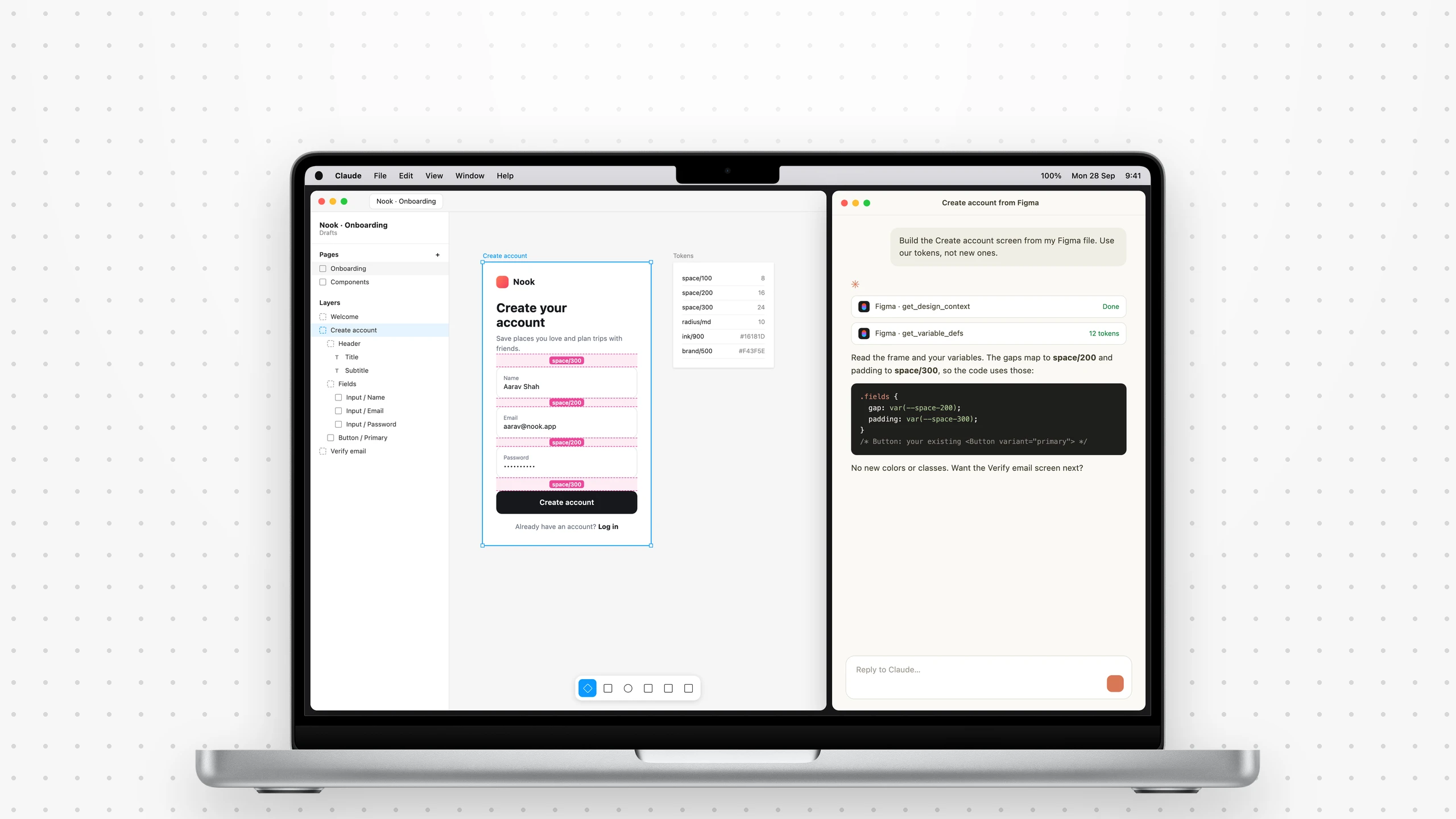
Most writing about MCP is for engineers, and starts with the protocol. That's the wrong end for a designer. The short version: MCP is the difference between describing your Figma file to an AI, and letting it open the file.
That sounds small. It isn't.
The problem it solves
For two years, AI design output was called generic, and everyone blamed the model. I think that was mostly wrong. The model was capable. It just knew nothing about your product.
Before MCP
- You send a screenshot. It guesses.
- You paste tokens. They go stale.
- You re-explain naming, every time.
With MCP
- It opens the actual file.
- It reads live tokens.
- Your conventions come with the task.
What MCP is
Model Context Protocol is a standard way for an AI assistant to connect to a tool: Figma, your repo, Notion, your ticket tracker, a database.
A designer already knows why this matters. Before design systems, every team built its own button. Before MCP, every AI integration was custom, and none of it carried over. MCP is the shared component: one protocol, and any tool that speaks it works with any assistant that does.
It came out of Anthropic in late 2024. It matters in 2026 because everyone else adopted it. A standard with one backer is a proprietary format with better marketing.
What changes on a normal Tuesday
The useful cases are boring, which is how you know they're real.
Reads the real file
Real values, components and tokens. Not a screenshot.
Audits that point somewhere
The exact layer and variable, not a guess.
Context with the task
The ticket, the doc, the decision. No tab-hopping.
Boring work, faster
Renames, tidy-ups, style checks. The work you skip.
The second one changed my week. Before, an audit meant screenshots and a list of "somewhere around the card". Now it names the exact layer and the variable it should use, and tidying a messy file is a request, not an afternoon.
Where it disappoints
No taste
It gets access, not judgement. That's still yours.
Demos mislead
Judge it on the fourth boring task.
Setup is rough
Authentication still eats twenty minutes.
It can read your things
Connect read-only where you can.
The first one matters most. Output now looks plausible enough to ship without a proper look.
Servers versus skills
These get mixed up, and they're different things.
A server gives it hands
Reads files, queries data, deploys.
A skill gives it instructions
Your conventions, and the approach you prefer.
When the result is wrong, ask: couldn't it reach something, or didn't it know something? The fixes are completely different.
Getting started
- 01
Connect one tool
Start with Figma. You already know what right looks like.
- 02
Add your repo
If you work near code. That's where the value compounds.
- 03
Allow fifteen minutes each
A few lines of config. An hour if auth fights you.
- 04
Check the output for a week
Is it right, in your system? If not, add instruction, not access.
What I'd tell a designer now
Learn it. In 2026 it isn't an experiment, it's plumbing. But hold the line on the part that's yours: MCP removes the excuse of missing context, not the need for judgement.
The best use I've found is unglamorous. It does the work I was skipping, not the work I enjoy.
For the same thinking on real products, see the case studies.